Claude Code, built in
Your own Claude Code, in a chat window. Nothing changes without your approval.
Kira is a desktop app for working with Claude Code. Every project, chat and change in one window, arranged the way you like.
Projects
Chat with Claude Code
Draft the hero copy from notes/brief.md
Writing three options to notes/hero.md.
notes/hero.md?
AllowDeny
Tasks
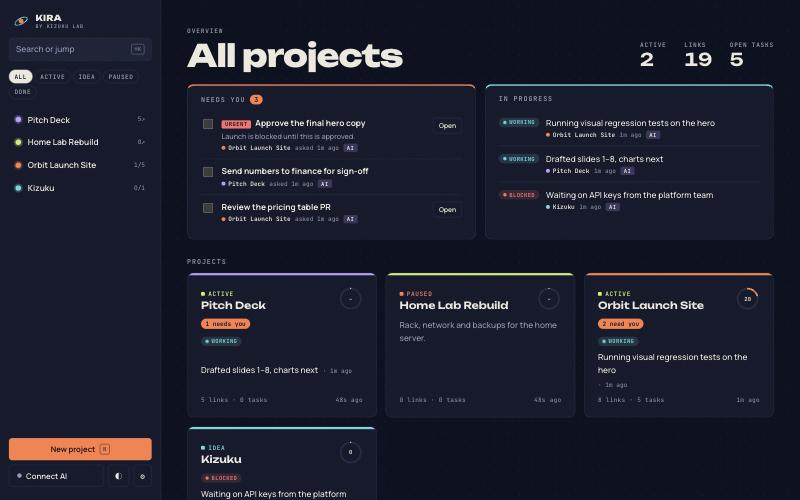
Approvals and blocked tasks from every project, in one list. Beside it, what each agent is doing.
Your own Claude Code, in a chat window. Nothing changes without your approval.
Tasks, notes and history live in the project folder as plain files. Nothing is locked in.
orbit-launch-site/
  .kira/project.json
  tasks.md
  activity.md
  notes/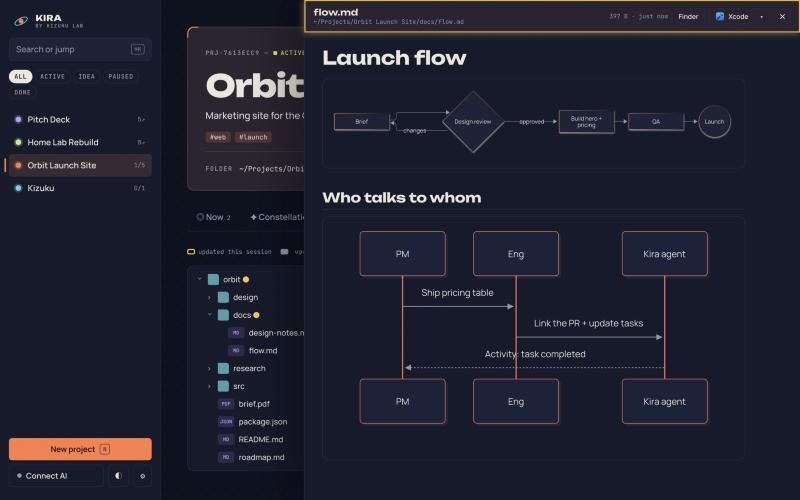
Markdown, diagrams and code, with this session's changes marked.
Home, Chat, and any page you add. Switch with Ctrl 1 to 9.
Claude Code, Claude Desktop and Cursor report progress as they work.
Every widget is a plugin, including ours. Write your own with HTML and a short manifest. Each one gets only the access it asks for.
plugins/weather/kira.plugin.json
{
  "id": "weather",
  "name": "Weather",
  "version": "1.0.0",
  "permissions": ["projects:read"],
  "widgets": [{
    "id": "today",
    "name": "Today",
    "entry": "widget/index.html"
  }]
}Free during the beta. Windows and Mac.
Yes, during the beta. The chat uses your own Claude Code plan.
On your computer. Kira has no account and no cloud.
The chat uses Claude Code. Any MCP client, like Cursor, can read and update your projects. More chat providers are planned.
Beta builds aren't signed yet. The install instructions show how to continue. Signed builds come before 1.0.
Yes. A widget is a small web page. Put its plugin folder in Kira's plugins folder.